Module 03 · Working with files, images & data
Practice: notes to tasks, receipt to table
Two exercises with fictional files: tidy meeting notes into a task table (who, what, when), then turn a receipt photo into expenses by category.
Download the two files below (or the full pack), then work in a new Claude chat. Each exercise has a Check your result box so you know whether Claude got it right.
Exercise 1 · Meeting notes into a task list
Meeting notes (messy)Quickly typed notes from a marketing team meeting: decisions, tasks and deadlines all mixed together.Markdown · 1 page · free Download-
Step 1: Open a new chat, click +, then upload
claude-latihan-notulen-rapat.md. -
Step 2: Send the following prompt.
Prompt Try in ClaudeThese are meeting notes that haven’t been tidied up yet. Organize them into: 1. A meeting summary (3 sentences) 2. Decisions that were agreed on 3. A task table: task, person in charge (PIC), deadline 4. Things that haven’t been decided yet Write each deadline with the day and the date. Don’t add any information that isn’t in the notes. The notes are in Bahasa Indonesia; reply in English.
-
Step 3: Ask for a follow-up: turn the task table into a WhatsApp message for the team group.
Prompt Try in ClaudeTurn that task table into a WhatsApp message for the team group: short, naming each PIC and their deadline, in a friendly tone.
Exercise 2 · Receipt photo into an expense table
Shopping receipt photoA 10-item receipt for practising reading an image, building a table and checking the total.JPG · ~100 KB · free Download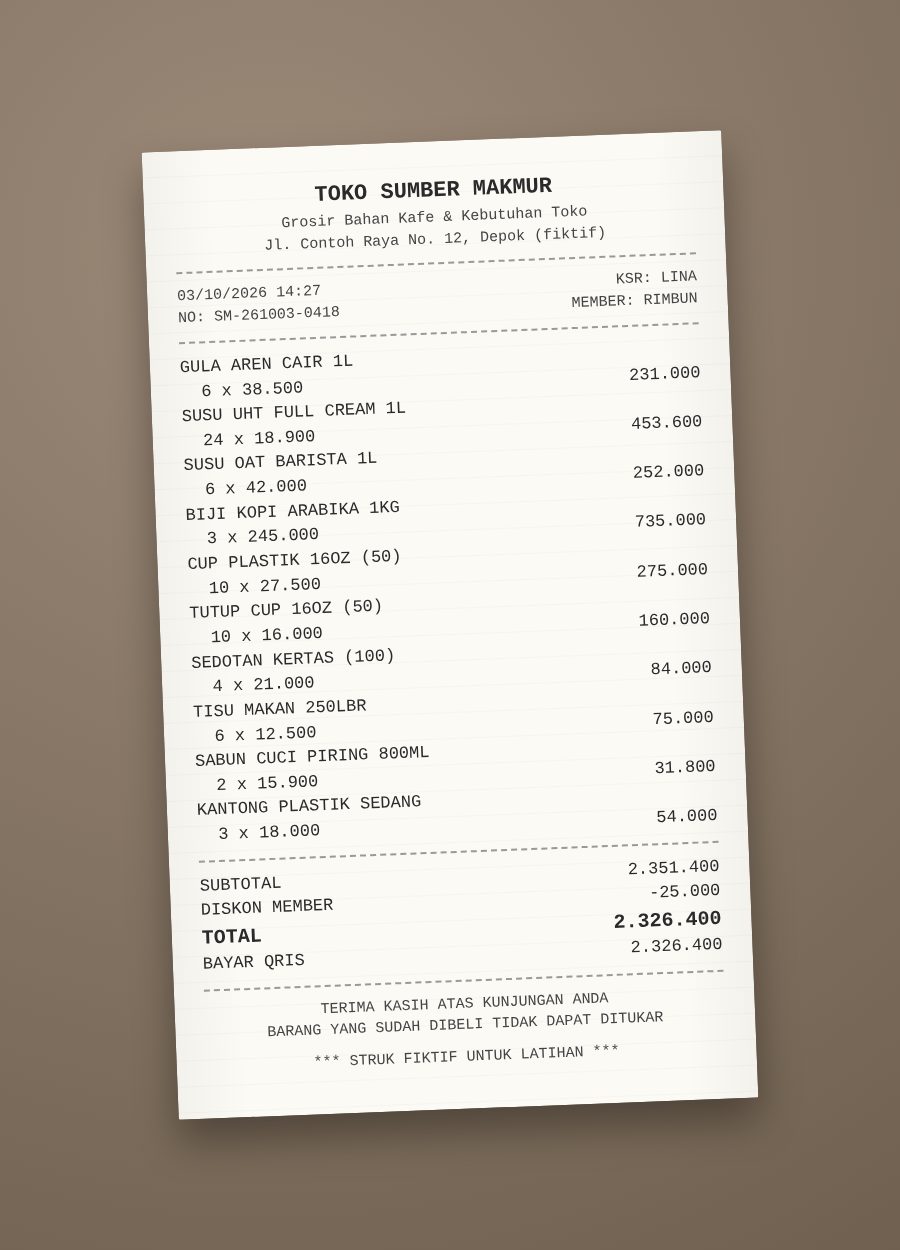
-
Step 1: In a new chat, upload
claude-latihan-struk-belanja.jpg. -
Step 2: Send the following prompt.
Prompt Try in ClaudeRead this photo of a receipt. Make a table: item name, quantity, unit price, total. Group the items into these categories: drink ingredients, packaging and cleaning supplies. Calculate the total per category, then check it against the subtotal and total on the receipt. The receipt is in Bahasa Indonesia; reply in English.
-
Step 3: Ask for an Excel version.
Prompt Try in ClaudeMake it an Excel file with 2 sheets: item details and a summary by category (using formulas), so I can add my next shopping trips to it.